
The Toast POS + PassKit integration gives restaurants a way to connect in-store transactions and customer activity to mobile wallet passes. Whether you want to issue a digital loyalty card after a guest’s first visit, update points based on spend, or promote customers to new tiers, Toast data can be used to automate how passes are created and managed in PassKit.
Note: Toast does not have an official Zapier or Make connector. Any connection requires Toast Partner API access (application/approval; access is scoped and often read-only) or data exports.
Setting Up The Integration
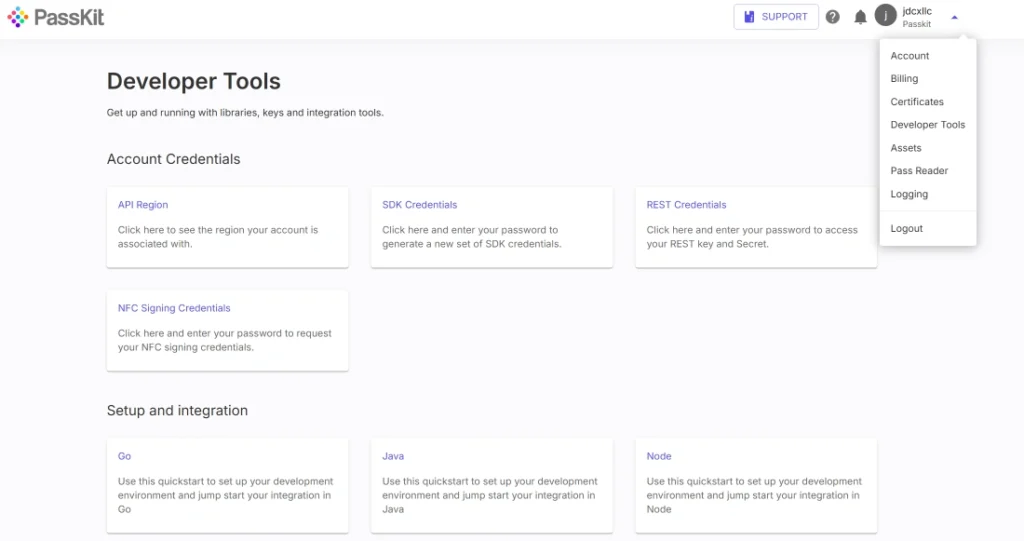
Follow these steps to connect Toast activity with PassKit:
- Create and publish your pass template in PassKit
(e.g., loyalty card, membership pass, coupon, or rewards card). - Retrieve your PassKit API details
Go to PassKit Dashboard → Settings → Developer Tools to obtain your API region, SDK host, and REST API prefix. - Generate API credentials
Create the API keys or tokens required to authenticate your PassKit requests. - Obtain Toast data
Access customer or transaction information from Toast using:- Data exports
- Built-in Toast reports
- Toast API access (only if API access has been enabled by Toast for the merchant’s account)
- Use an integration layer to send data to PassKit
Automations can be built using:- A custom backend or server
- An ETL or integration partner
- No-code platforms such as Zapier or Make, using their webhook/HTTP modules or available third-party Toast connectors
These tools can trigger new pass issuance or update existing passes when specific events occur, such as completed orders, loyalty sign-ups, or spend milestones.
- Optionally configure PassKit webhooks
PassKit can notify your system when passes are installed, updated, scanned, or removed. These events can be routed into:- CRMs or marketing tools
- Automation platforms
- Custom services that can (where permitted by the merchant’s Toast integration level) update customer records or loyalty data.
This setup keeps your loyalty program synchronized with real guest activity without requiring manual processes.
Common Use Cases
Toast POS + PassKit is ideal for restaurants and hospitality businesses that want to connect physical purchases with mobile-first loyalty through Apple Wallet and Google Wallet passes.
- Automatically issue a digital loyalty pass when a new customer signs up
- Update pass point balances based on spend recorded in Toast
- Upgrade pass tier levels automatically when spend thresholds are reached
- Re-engage customers using PassKit webhooks when pass activity declines
- Deliver rewards or mobile coupons when certain menu items are purchased
These workflows help link in-store behavior with mobile-first engagement.
Requirements
To use this integration, you will need:
- A PassKit account with a published pass project
- Access to Toast POS data:
- Via exports or reports, or
- Via the Toast API (only if the merchant’s Toast account has API access enabled)
- API credentials from PassKit Developer Tools
- An integration mechanism such as:
- A custom script or backend
- An automation platform (e.g., Zapier, Make, or similar) configured to call Toast APIs or process exported data
- Defined business rules for when passes should be issued, updated, or revoked
This setup can be customized to match the restaurant’s unique loyalty program structure.
Support And Documentation
Helpful resources:
Integrating Your POS with PassKit
Accepting Passes for In-Person Validation
Do I Need a POS System to Use Passkit?
SDK and API Configuration Settings
Frequently Asked Questions
Can I Issue A Loyalty Pass When A New Toast Customer Is Added?
Yes. If you have access to customer data through Toast exports or APIs, you can trigger the automatic creation of a PassKit loyalty pass.
Can I Sync Loyalty Points From Toast To A Digital Pass?
Yes. PassKit API calls can update point balances or tier levels based on Toast transaction data.
What If I Don’t Have Access To The Toast API?
You can still automate loyalty updates using exports, reports, CSV files, or integration tools that support scheduled imports and custom triggers.
Can I Track When Customers Install Or Use Their Pass?
Yes. PassKit webhooks can notify your system when a pass is installed, scanned, updated, or removed, enabling follow-ups or automations.
Is It Possible To Revoke Passes Based On Refunds Or Inactivity?
Yes. PassKit can deactivate or update passes based on Toast transaction history, refund reports, or behavioral triggers handled in your integration layer.